A major new version of CNC Simulator Pro is on the way
The next version of CNC Simulator Pro is shaping up to be one of the most substantial updates we have made in years.
A major step forward in CNC controller compatibility leads a wide range of improvements: more advanced collision detection, deeper CNC program analysis, a much more useful 2D simulation, stronger macro and subprogram support, AI-assisted tools, a completely redesigned Cloud files system, and a more modern user interface.
The goal is not simply to add more features, but to make CNC Simulator Pro better at every stage of the workflow — programming, understanding, simulating, checking, troubleshooting and sharing CNC work.
And there is much more throughout the program. Below are some of the features and improvements already completed for the next release.
What is new?
A major leap in controller compatibility
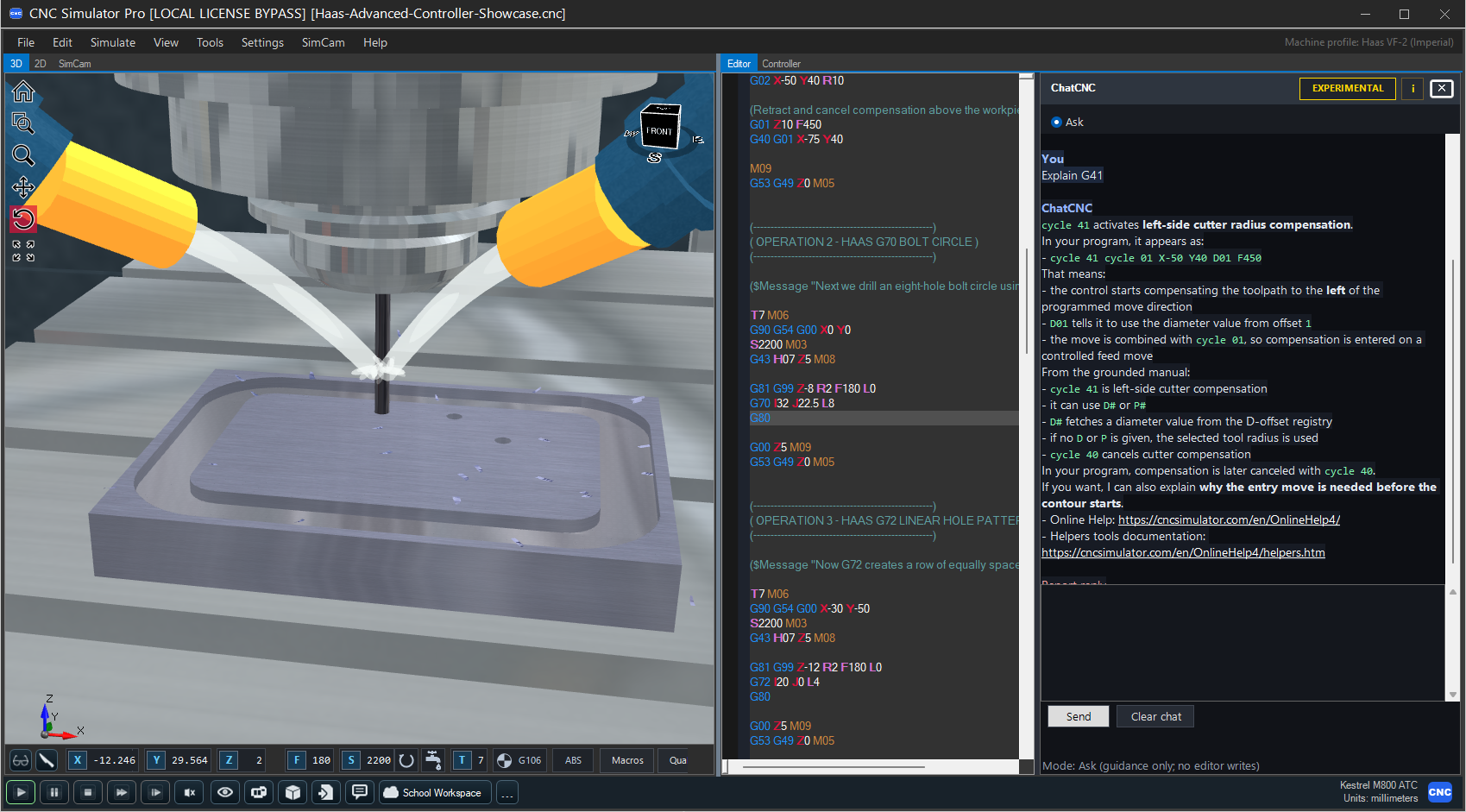
Controller compatibility is one of the biggest advances in the next release. CNC Simulator Pro brings expanded support for FANUC, Haas, HEIDENHAIN TNC, Siemens SINUMERIK and Mitsubishi MELDAS milling controls, making it easier to learn and practise the programming conventions of the control you use.
Select a controller in Machine Profiles to use its supported syntax and programming behaviour. Differences in cycles, macro arguments, work offsets and coordinate transforms are handled according to the selected controller, giving your simulation a closer connection to the way you program the machine.
FANUC Mill — familiar ISO milling, Custom Macro B, programmable and extended work offsets, scaling, mirroring and subprogram support.
Haas Mill — expanded pocket milling and hole-pattern support, macro calls, extended work offsets, coordinate transforms and canned cycles.
HEIDENHAIN TNC — supported Klartext programming, including tool calls, contour moves, Q parameters, label calls and selected machining cycles.
Siemens SINUMERIK — R parameters, conditional jumps, programmable coordinate frames and selected drilling cycles.
Mitsubishi MELDAS — macro programming, structured IF/ELSE logic, work offsets, coordinate transforms and subprograms.
The selected controller also guides IntelliSense and code explanations, helping you discover the right commands and understand their parameters while you write. The offline Help > Code Info reference follows the active controller, and controller-specific example programs let you explore the supported features in practice.
Support covers documented subsets of each milling control. Controller Information clearly lists the supported features and limitations for your selected controller, so you can see what is available before choosing or adapting a program.
For tutorials and shared examples, $TemporaryWorkOffset can define G54–G59 offsets for the current simulation without changing your saved offsets. The temporary values are discarded on reset.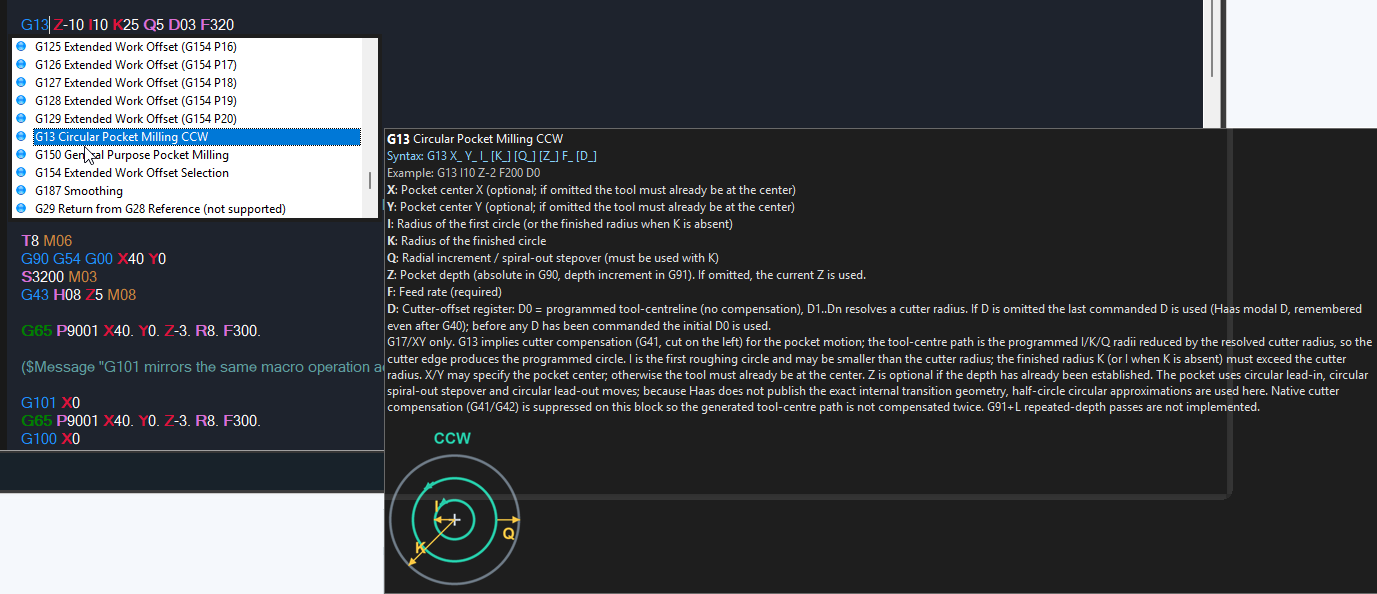
Introducing ChatCNC
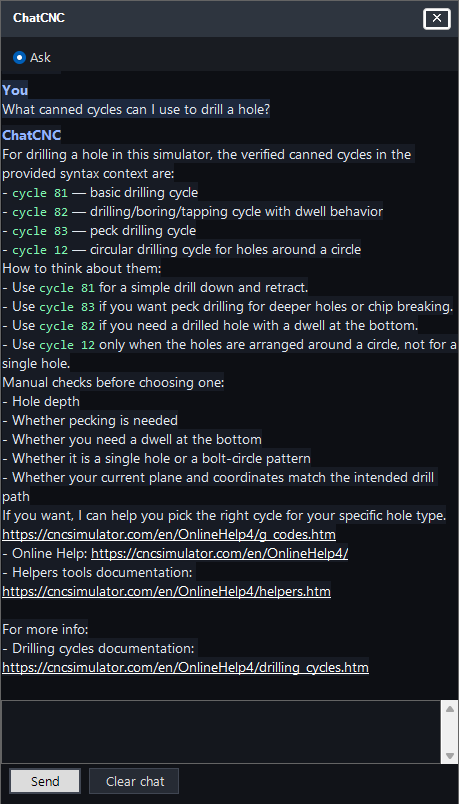
Added ChatCNC, a new AI assistant for CNC code explanations and guidance directly inside CNC Simulator Pro.
Redesigned Cloud files
The Cloud files system has been completely redesigned, making it much easier to store, browse, open and share CNC Simulator Pro files directly from inside the program.
Added a new built-in Cloud files browser with a modern visual interface.
Cloud files can now include CNC programs, SimCam files and workpieces.
Files are shown with previews, file type information, machine information and other useful metadata.
Added filtering and search to make larger cloud libraries easier to manage.
The redesigned Cloud files system provides a central place for storing, sharing and opening CNC programs, SimCam projects and workpieces.

New machines
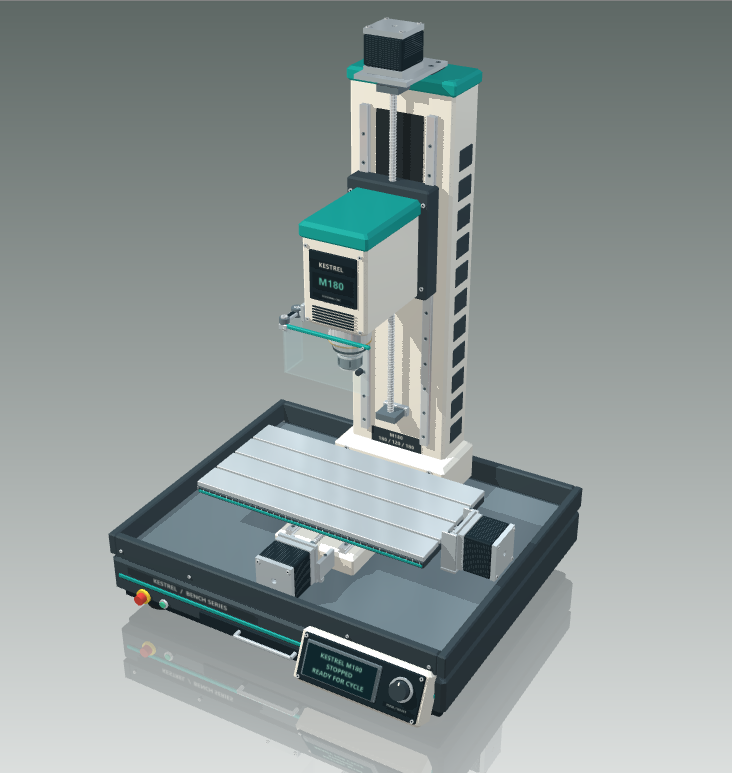
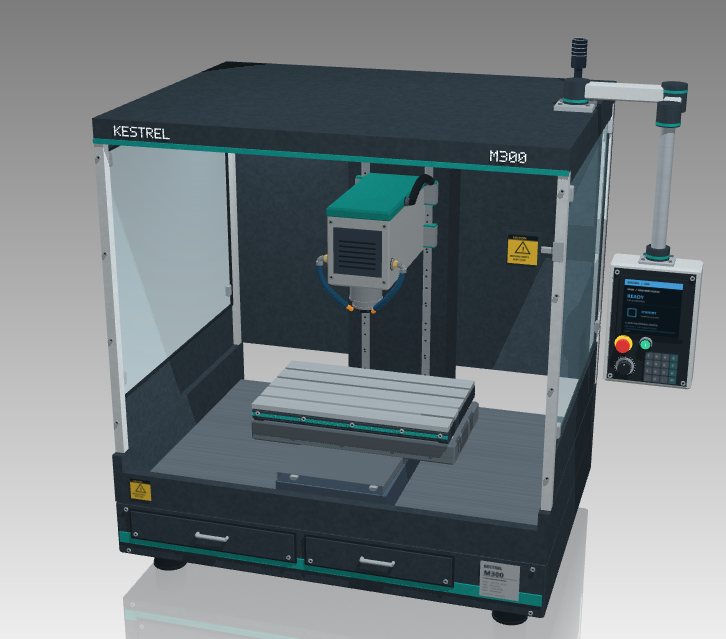
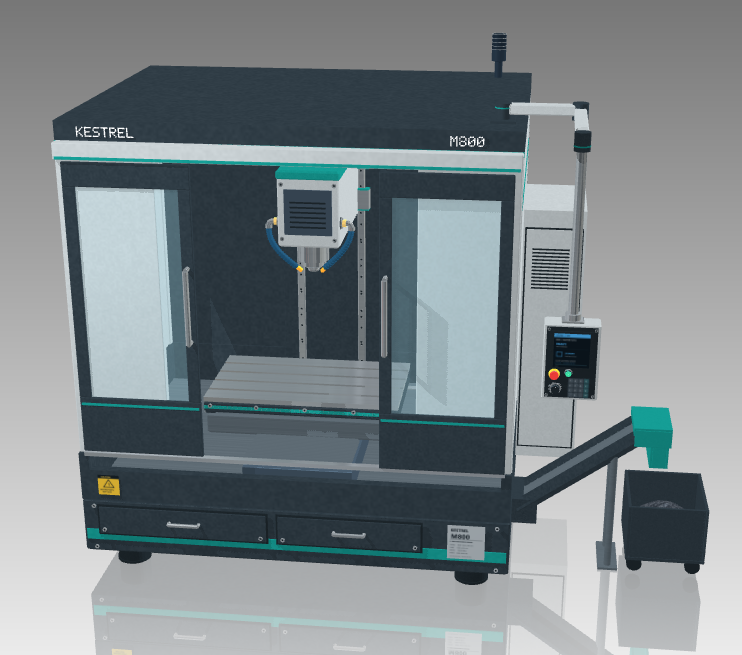
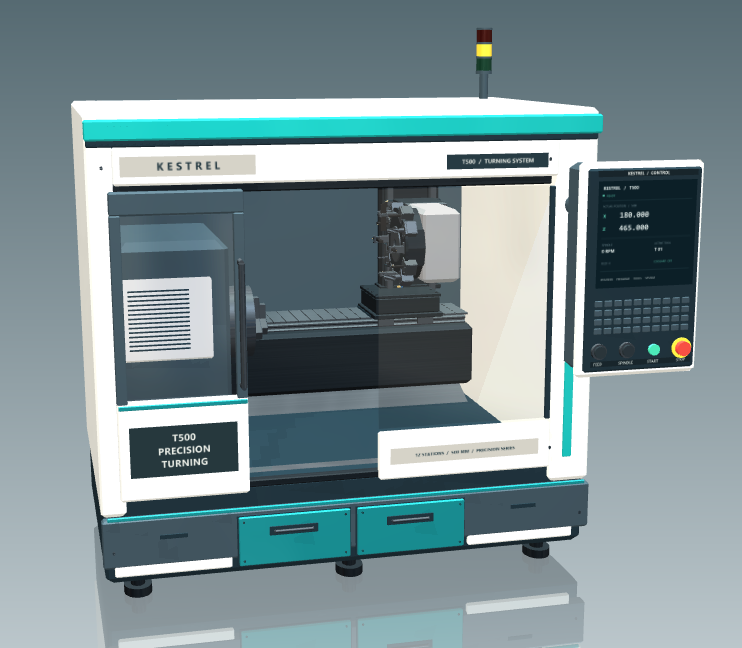
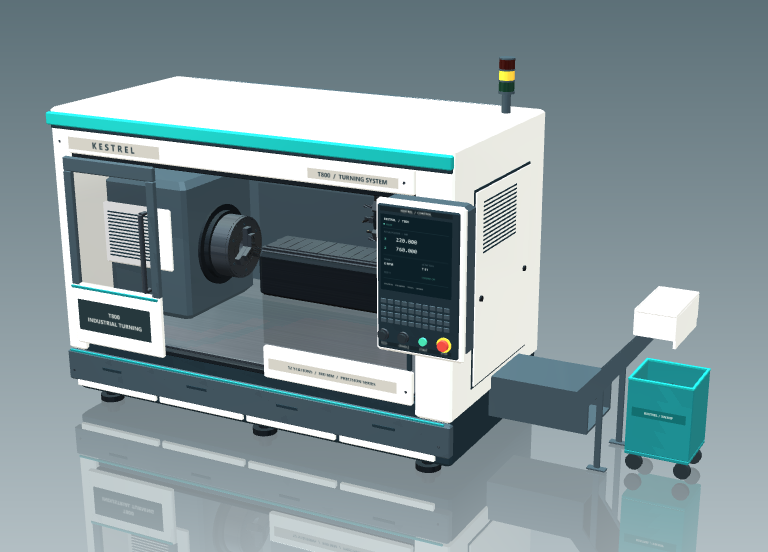
Meet Kestrel, our new virtual CNC machine family, created for CNC Simulator Pro. Each model offers a different machine size and layout for learning and simulation. The range includes the compact M180 hobby mill, the M300 three-axis machining centre, the larger M800 ATC, and the T500 and T800 turning centres.
We have also added Milling Center V2 and Turning Center V2, bringing more detailed machine components and enclosed layouts to the familiar standard machines. Together, these additions offer a wider choice of machining environments, from small benchtop mills to enclosed industrial-style milling and turning centres.
 |  |  |
 |  |
Collision detection and collision analysis
CNC Simulator Pro can now perform much more detailed collision testing during milling and turning simulations.
Added tool-holder collision detection against remaining workpiece material for milling and turning.
Collision detection now follows the actual holder profile more accurately, including collisions that occur when entering material from the side.
Added Simulate with collision detection, allowing you to perform a one-time collision test without changing your normal simulation settings.
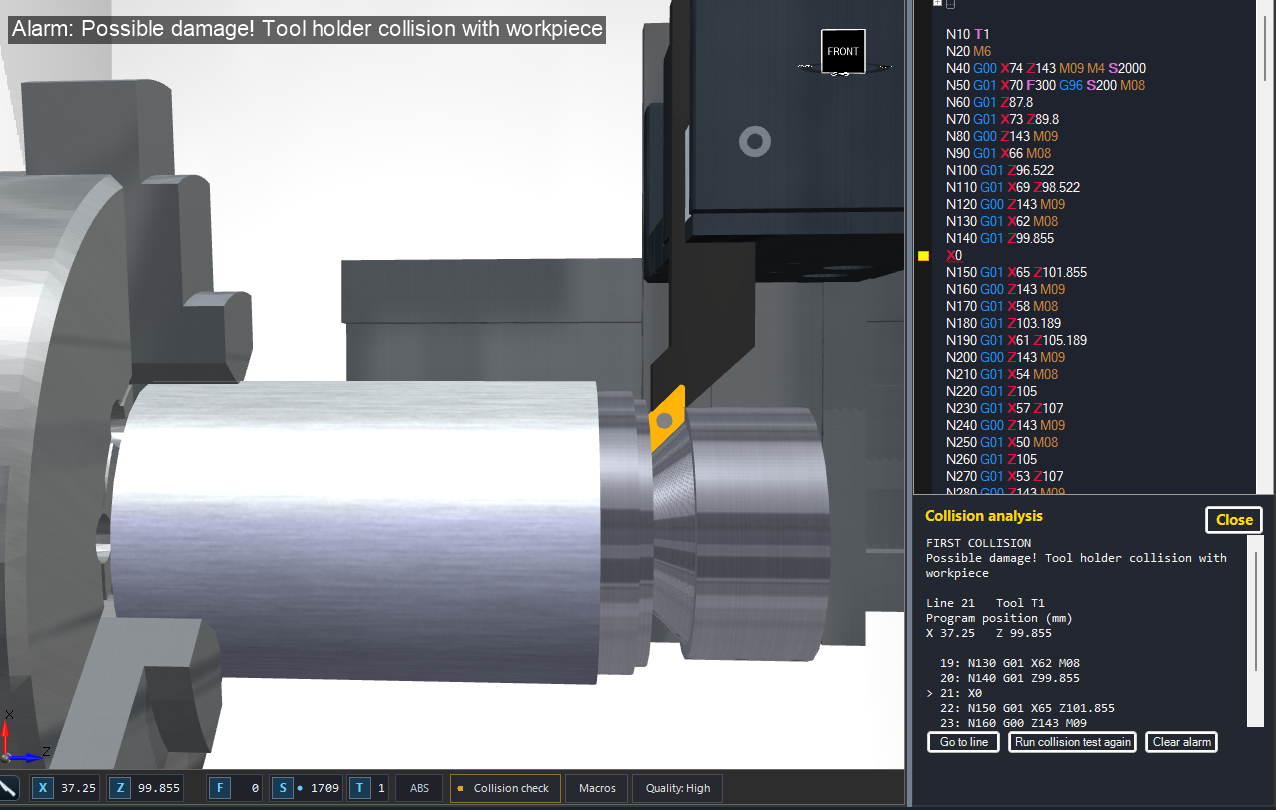
A visible Collision test indicator is shown while a collision test is running or paused.
Added a new Collision analysis panel showing the first detected collision, the active tool, program coordinates and nearby CNC program lines.
The analysis panel includes commands to go directly to the relevant program line, repeat the collision test or clear the alarm.
Collision details remain visible beside the stopped 3D simulation instead of being hidden by an alarm popup.
Improved collision-checking performance so detailed collision tests have less impact on simulation playback speed.
Collision testing and collision analysis are available for milling and turning machines.
A smarter CNC program browser
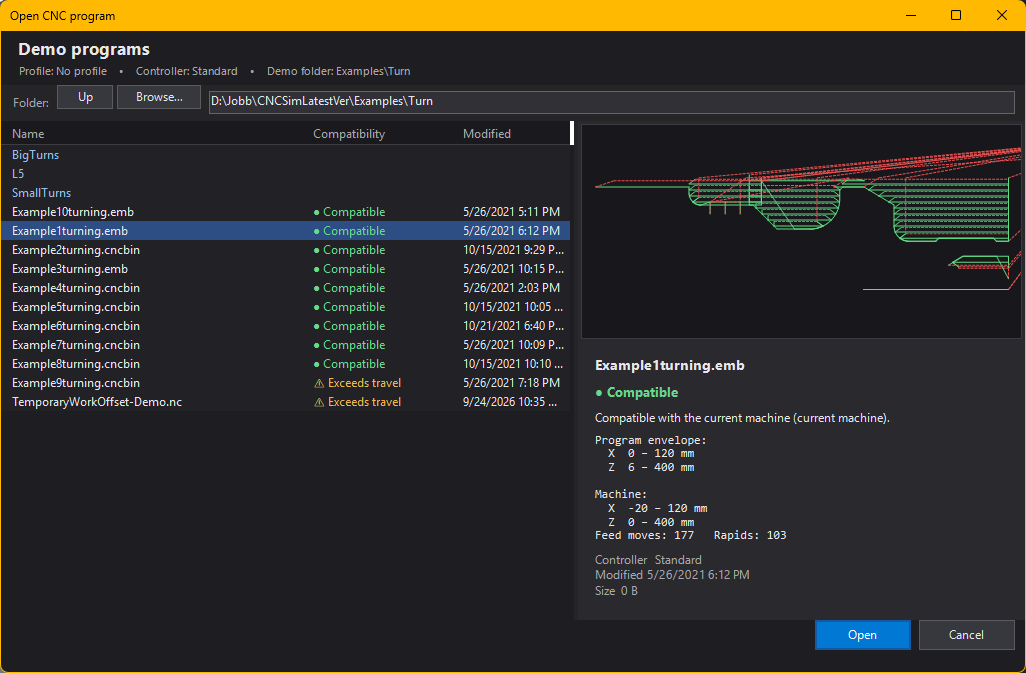
The redesigned Open CNC Program window makes it easier to choose suitable programs and spot setup problems before simulation.
Preview milling and turning toolpaths, with clear cutting and rapid movements, and browse examples matched to the active controller.
See warnings for machine-travel limits, inch/millimetre mismatches and milling/turning mismatches. Travel checks account for work offsets, coordinate transforms, cycles, macros and subprograms.
Browse folders while previews and compatibility checks run in the background. Incomplete analyses are clearly identified.
A new generation of CNC analysis
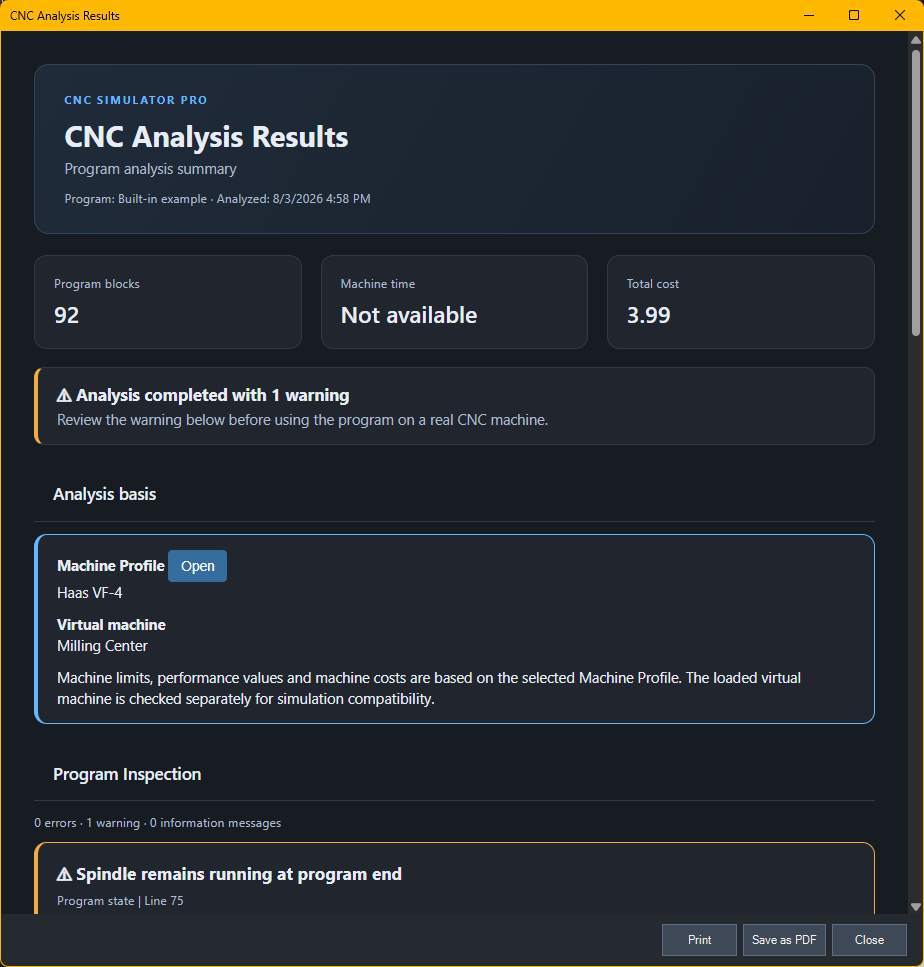
The new analysis system performs deeper checks of both CNC code and the resulting toolpath. It is designed to give users clearer feedback before a program is run on a real machine.
Expanded CNC Analysis reports with executed-program statistics, tools used and inspection issues.
Added machine Profiles to the File menu.
Compare the toolpath against the travel limits of both the loaded machine and the active profile. Machining time and cost are presented as estimates, with improved time calculations for constant surface speed and feed per revolution.
A more powerful 2D simulation
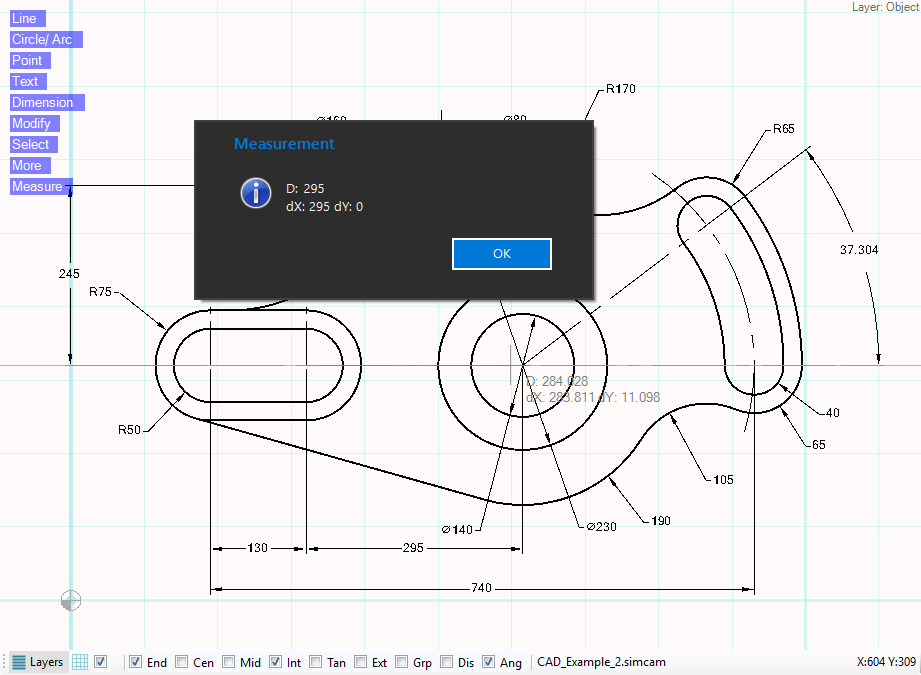
SimCam and the 2D simulation view have been expanded with practical measuring tools, improved toolpath visualization and better consistency with the 3D simulation.
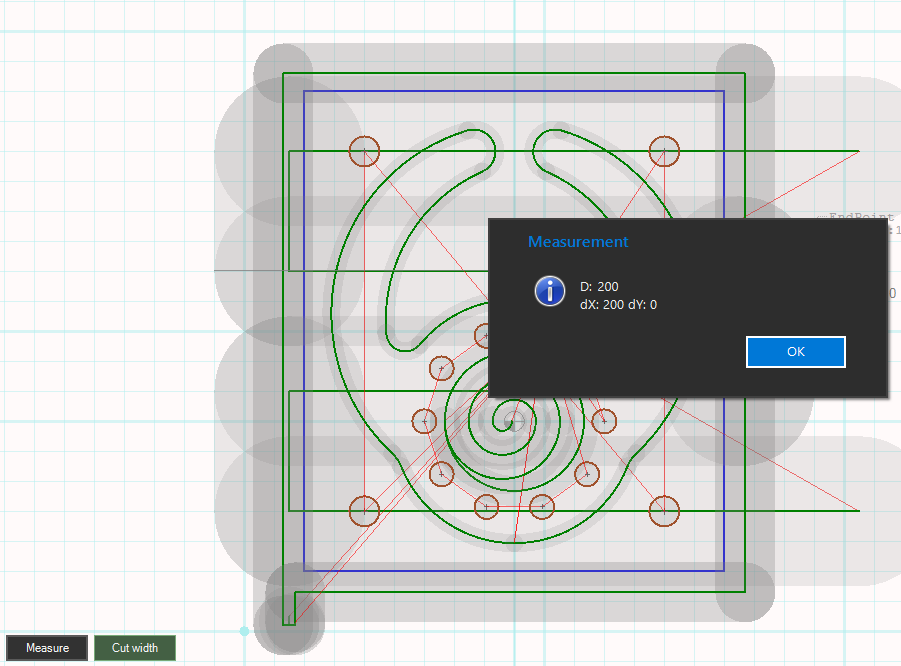
Added a measuring tool in SimCam.
Added measuring directly in the 2D view.
Added a Tool Width display mode in the 2D view.
Macro programs can now be simulated in 2D.
Improved the measuring and cut-width functions so drill holes are included.
Fixed a discrepancy where the 2D toolpath did not match the correct 3D toolpath.
Added automatic tracking of whether the displayed 2D toolpath is still current after changes to the CNC program, machine, settings, inventory, files or simulation state.
When the displayed toolpath is outdated, the 2D view now shows a notification with a Resimulate command.
Resimulate performs a fast 2D simulation to refresh the displayed toolpath.
Fixed click-to-locate sometimes remaining unavailable after a successful 2D simulation.
Added clearer X0, Y0 and Z0 indicators in the viewport, with zero-coordinate axes highlighted using a greener tint.
Added a compact legend for feed movements, rapid movements, drilling, the workpiece and zero axes.
Rapid movements now use less prominent dashed red lines, making cutting movements easier to distinguish.
Modernized the 2D object information tooltip for improved readability.

Macro programming and GOTO improvements
The macro interpreter now supports variable jump targets. Instead of hard-coding the destination sequence number, a macro variable can define where execution should continue.
Why it matters Variable jump targets make reusable macros easier to write, configure and maintain. The same program can select different paths without changing the GOTO statement itself. |
Example
#120 = 1 (Set to 1 to take the jump, 0 to skip it) #123 = 111 (Target sequence number) #124 = 0 (Result flag)
|
Additional macro-flow improvements
Improved GOTO reliability and handling of edge cases in macro program flow.
Fixed active-line jitter: the editor no longer appears to step through blocks that are skipped by a jump.
Made GOTO execution more responsive by locating the target without visually moving through intermediate lines.
Additional GOTO compatibility improvements
Further improvements have been made to macro-program GOTO handling for better compatibility with common Fanuc and Mazak programming conventions.
Improved forward GOTO searches within the current program or subprogram.
Added improved handling of O-number and colon-based program sections.
Added support for zero-valued jump labels where applicable.
Added stricter validation so malformed or embedded sequence labels are not incorrectly selected as jump destinations.
Improved subprogram calls
Added M98 subprogram start-block support using Q for Fanuc or H for Mitsubishi, Meldas and Mazak. Calls begin at the specified N block and report an error if it is missing.
Editor improvements
New context-menu commands help users understand CNC code directly inside the editor, while font zoom makes longer editing sessions more comfortable.
Explain block (AI) | Uses AI assistance to explain the selected CNC block or instruction in plain language. |
Editor font zoom | Hold Ctrl and use the mouse wheel to increase or decrease the CNC editor font size. |
| |
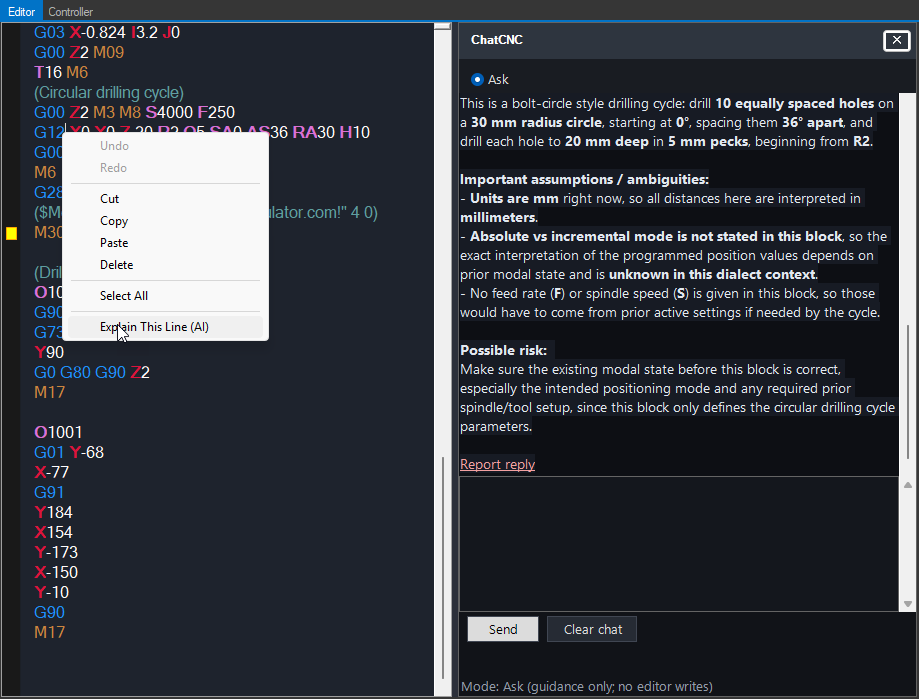
The editor also offers tools for converting to absolute or incremental coordinates, creating subprograms and parameterising selected lines work correctly again.
Inspect and share workpieces in a browser
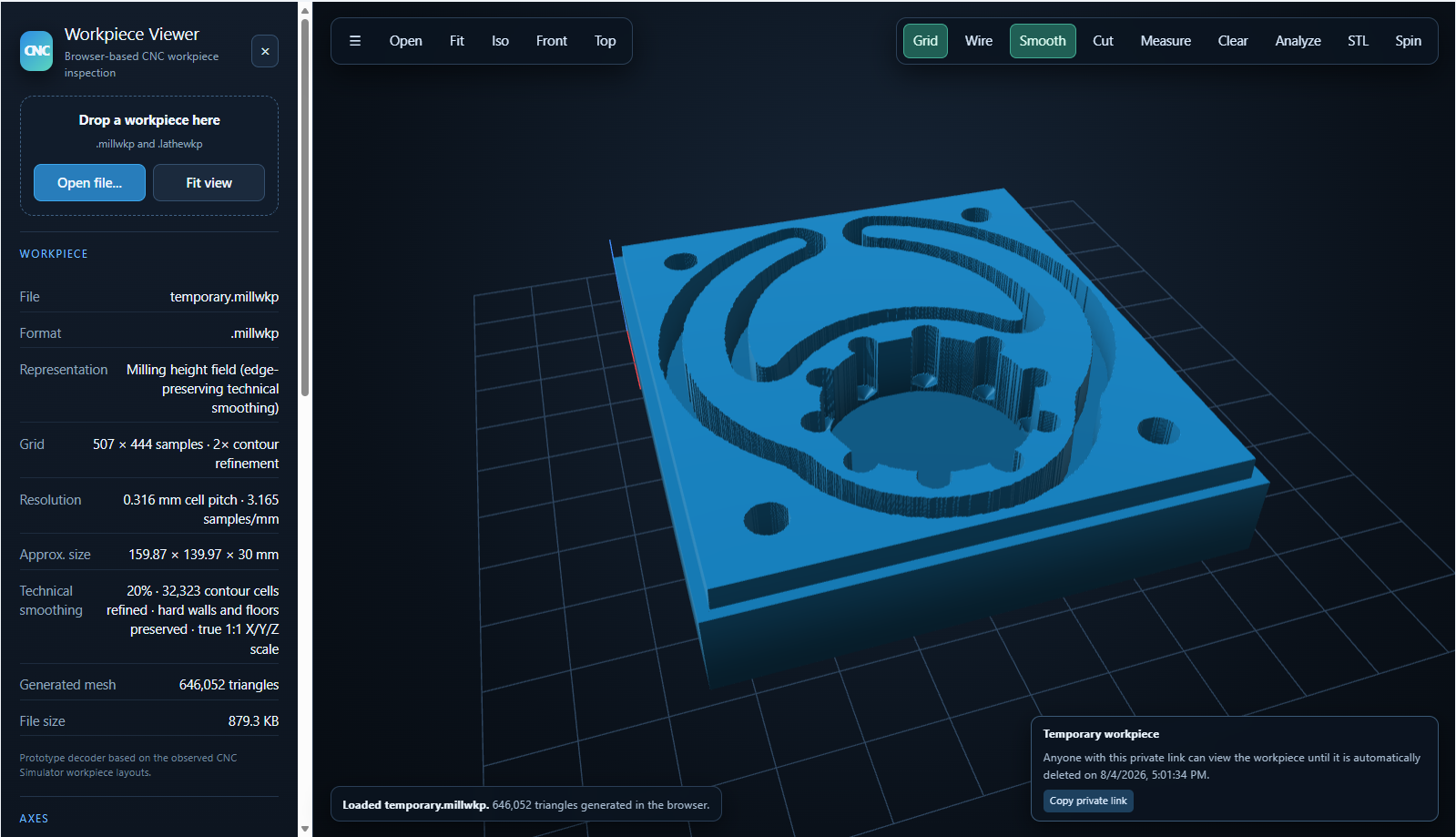
A command in the Misc menu sends the current workpiece to the web viewer for convenient browser-based inspection and sharing.
Added Send Workpiece to web viewer to the Misc menu.
The command opens the workpiece in the web viewer, where it can be inspected and shared.
Improved simulation interface
Several parts of the simulation interface have been refreshed to provide clearer status information while using less screen space.
Added compact status badges for active simulation options.
Added clearer collision-detection status indicators and shortcuts to the related Program settings.
Modernized the coordinate, feed, spindle and tool readouts, with change highlights, an ABS/INC indicator and clearer active work-offset information.
While paused or stopped, click a status readout to jump to the CNC block that last changed it, without losing your resume position.
Improved the layout of option indicators on smaller windows, and refreshed the toolbars, settings, Inventory and Machine Browser.


Clearer feed and spindle behaviour
Feed and spindle simulation now gives clearer feedback about programmed values, calculated rates and machine limits.
Improved G96 constant surface speed and G97 fixed-RPM behaviour for turning, including metric/inch units and RPM limits.
In G95 feed-per-revolution mode, the F readout shows the calculated feed per minute as spindle speed changes. Mode indicators and tooltips explain the active settings.
Invalid or excessive explicit feed and RPM commands stop simulation with an alarm. Calculated rates are limited where appropriate, with amber markers and tooltips showing the applied limit and its source.
Feed playback is more consistent across G94/G95, metric/inch programs and different machine profiles.

Tool changers
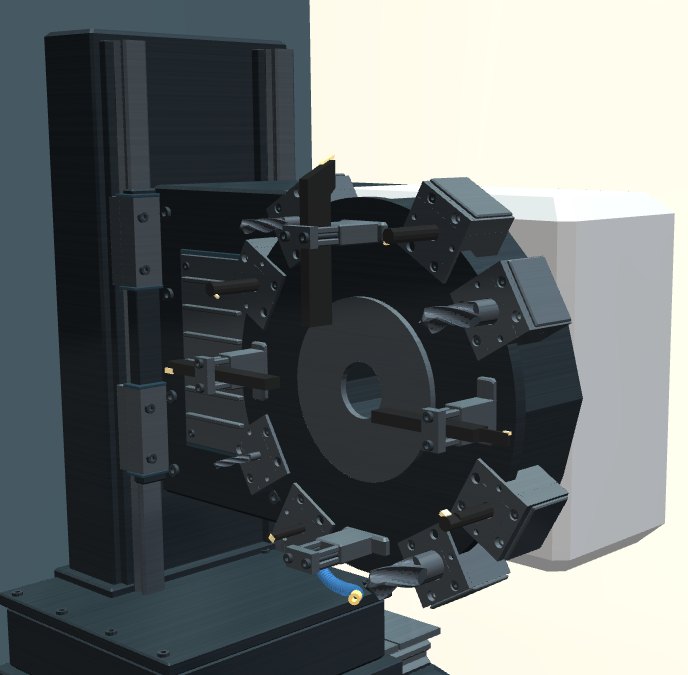
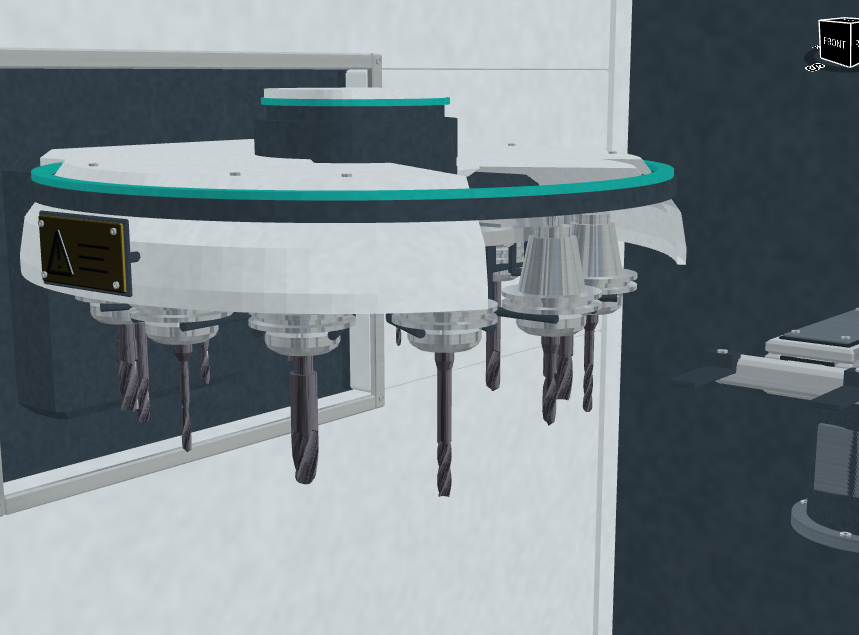
Tool changes are now fully animated on supported machines. On the Kestrel M800 ATC, watch the magazine rotate, the transfer arm move between the magazine and spindle, and the tool holder being released, exchanged and clamped. The sequence shows the actual outgoing and incoming tools, with synchronized machine sounds and optional camera focusing for a closer look.
Turning machines such as the Kestrel T800 also show the turret rotating into position and the next tool becoming active. These animations make tool changes easier to follow and help you understand how the machine moves from one operation to the next.
 |  |
Machine sounds
The new machine sound system brings supported milling and turning machines to life, helping you hear the difference between moving, cutting and changing tools.
Spindle and axis sounds follow machine activity, including changes in spindle speed and movement.
Cutting sounds respond to feed and actual material removal, with distinct milling, turning and drilling sounds and different character for metal, wood and plastic.
Supported machines include synchronized tool-changer, turret and door sounds, together with continuous coolant spray audio.
Use the Machine sounds toolbar button to turn sound on or off. A setting lets you start machines silently.
More realistic and smoother 3D simulation
Updated materials and animated effects make machining easier to follow and more convincing to watch.
Metal workpieces now distinguish dull stock surfaces from shiny machined faces with subtle cutter marks. Supported machines show metallic milling chips and animated coolant jets and splashes.
Clearer workpiece edges improve transparent-stock viewing, with an Edges option for opaque stock. The View panel can switch between your own materials and built-in materials.
Improved rapid and feed movement smoothness, including simulations with coolant, chips and other effects enabled.
On supported machines, Cinematic mode plays recorded camera views. New automatic-tool-changer settings let you choose whether the camera focuses on tool changes and whether it pans or jumps to the view.
Better close-up 3D viewing
The 3D viewport has been improved when examining the workpiece and machine from very close distances.
Fixed geometry being clipped when zooming in closely and rotating the 3D view.
Improved close-up depth precision to reduce visual surface artifacts.
Workpieces with metadata
Added the new CWP workpiece file format.
CWP files can store workpiece geometry together with additional metadata, providing a better foundation for exchanging and managing workpieces between CNC Simulator Pro and related tools.
Reset simulation
Added Reset simulation to the Simulate menu, providing a quick way to return the current simulation to its initial state.
Improved web integration
Web-based features inside CNC Simulator Pro have been modernized.
Improved opening of supplied web pages in separate popup windows when appropriate.
Modernized web browsing inside program tabs.
Updated startup and trial experience
Added a new splash screen and redesigned About window.
Fixed white or blank controls briefly flashing during program startup.
Added clearer trial-status messages during startup.
Added a dedicated trial-information window instead of sending trial users directly to the license settings.
SimCam improvements
SimCam project files can now be loaded directly from the command line, making it easier to open them from Windows, shortcuts, scripts and external applications.
Bugs and stability fixes
We have fixed bugs and improved stability, performance and visual consistency in many parts of CNC Simulator Pro.
Improved simulation and collision-test performance.
Fixed several collision-test state and alarm-handling issues.
Fixed startup and interface initialization issues.
Improved 2D and 3D visualization accuracy.
Improved program validation and error reporting.